Table of Contents
Downloading SOLYX Go Data
Export SOLYX Go measurements from the Handhelds tab in ZENTRA Cloud as a spreadsheet, filtered by surface and period.
Table of Contents
Export SOLYX Go measurements from the Handhelds tab in ZENTRA Cloud as a spreadsheet, filtered by surface and period.
Overview
Measurements you take with the SOLYX Go app are saved to your ZENTRA Cloud organization and listed by device on the Handhelds tab of the Devices page. From there, you can export them as a spreadsheet, filtered by surface and time period.
To take measurements, see Taking Measurements with SOLYX Go.
Downloading Your Data
Navigate to Handhelds
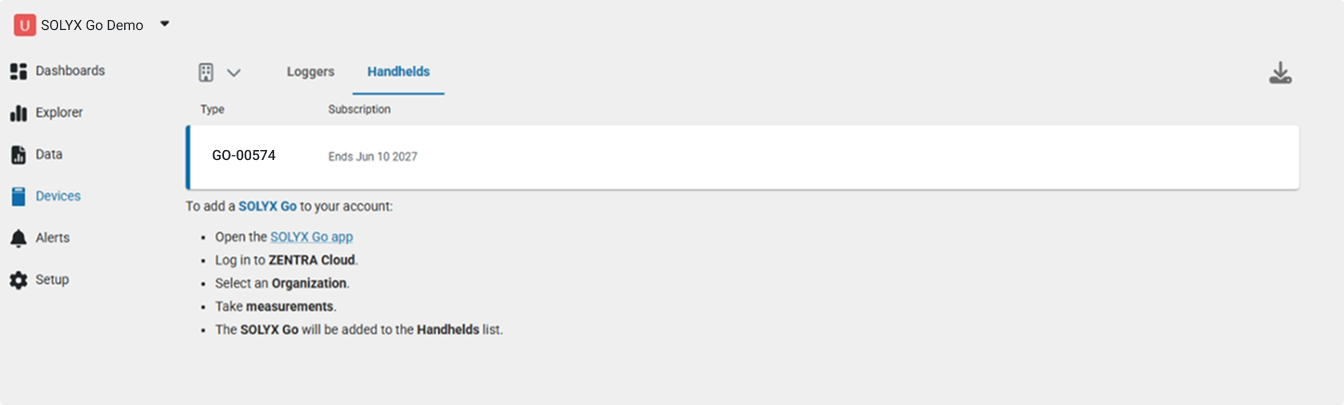
Go to Devices in the left navigation, then select the Handhelds tab. Your SOLYX Go (e.g., GO-00574) appears here along with its subscription end date.
Subscription included with purchase. The first year of service is included with your SOLYX Go. See Taking Measurements with SOLYX Go for when it starts.
No device visible? Your SOLYX Go appears here after you take at least one measurement in the SOLYX Go app while signed in to your ZENTRA Cloud organization. See Taking Measurements with SOLYX Go.
Open the Download Dialog
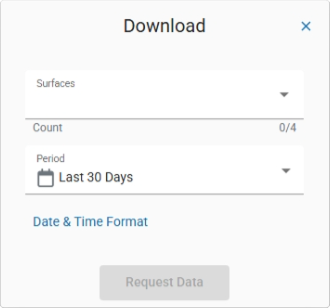
Click the download icon in the upper-right corner of the Handhelds list. A Download dialog appears with options for filtering your data.
Select Surfaces and Period
In the Download dialog:
- Surfaces - Click the dropdown to expand the list and select one or more surfaces from which you want to download data. You can select multiple surfaces (e.g., no-till, conventional till, cover crop). The Count field shows how many surfaces are selected out of the total available.
- Period - Choose the time range for your export. The default is Last 30 Days. Additional period options are available from the dropdown.
- Optionally, click Date & Time Format to adjust how timestamps appear in the exported file.
Once your selections are made, click Request Data.
Download the File
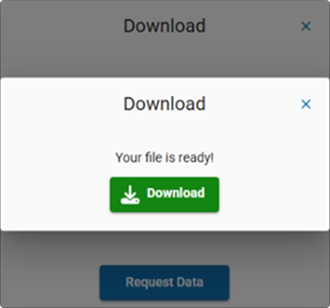
After processing, a second dialog confirms "Your file is ready!" Click the green Download button to save the spreadsheet to your device.
Notes
- The Subscription column on the Handhelds tab shows when your current SOLYX Go subscription expires.
- Downloaded data is provided as a spreadsheet file compatible with standard analysis tools.
- Only surfaces with measurements during the selected period will contain data in the export.
How did we do?
Taking Measurements with SOLYX Go
